Hirdetés
- sziku69: Szólánc.
- Luck Dragon: Asszociációs játék. :)
- bb0t: Ikea PAX gardrób és a pokol logisztikája
- GoodSpeed: A RAM-válság és annak lehetséges hatásai
- GoodSpeed: Márkaváltás sok-sok év után
- Sub-ZeRo: Euro Truck Simulator 2 & American Truck Simulator 1 (esetleg 2 majd, ha lesz) :)
- sziku69: Fűzzük össze a szavakat :)
- ldave: New Game Blitz - 2025
- Real Racing 3 - Freemium csoda
- Gurulunk, WAZE?!
-

LOGOUT
Linux kezdőknek - érdemes beleolvasni, mielőtt kérdezel

Új hozzászólás Aktív témák
-
#103922
 tordaitibi
veterán
Bici
#103913
tordaitibi
veterán
Bici
#103913
Ha valóban ez van, bár nem értem hogyan lehet,
a grub.cfg-be át kéne írni a Windows boot bejegyzését.
Arra az efire mutasson ahol a win betöltője van.
Itt kéne kutakodni, /boot/grub/grub.cfg### BEGIN /etc/grub.d/30_os-prober ###menuentry 'Windows Boot Manager (ezen: /dev/sda1)' --class windows --class os $menuentry_id_option 'osprober-efi-D21A-2291' {savedefaultinsmod part_gptinsmod fatset root='hd0,gpt1'if [ x$feature_platform_search_hint = xy ]; thensearch --no-floppy --fs-uuid --set=root --hint-bios=hd0,gpt1 --hint-efi=hd0,gpt1 --hint-baremetal=ahci0,gpt1 D21A-2291elsesearch --no-floppy --fs-uuid --set=root D21A-2291fi
chainloader /efi/Microsoft/Boot/bootmgfw.efi -
#80929
 gregory91
senior tag
tordaitibi
#80927
gregory91
senior tag
tordaitibi
#80927
gregory91
senior tag
válasz
 tordaitibi
#80927
üzenetére
tordaitibi
#80927
üzenetére
"Megtalált windows loader vagy winloader vagy chainloader akkor.."
Vagy "chainloader +1" vagy ntldr. -
#80927
tordaitibi
veterán
-szabi-
#80926
válasz
 -szabi-
#80926
üzenetére
-szabi-
#80926
üzenetére
Ha 1 meghajtón, lemezen van a Win meg a Linux ÉS MBR akkor a Master Boot Recordba átírja a grubot mert abba nem fér bele 2 indító, így tudom a legérthetőbben megfogalmazni.
Ha átíratod, és törlöd a Linuxot akkor a MBR grub, icipici bejegyzés hogy hova adja át a további bootolási paramétert, az nem fog sehova mutatni mert nincs mire, nincs Linux. Aminek a grubja átveszi az MBR-ből irányuló indítóparancsot. És amit ekkor látsz, az indító-választómenü, azt már a Linux partíción csücsülő grub mutatja neked, nem az MBR-be lévő kis grub.
Máshogyan nem tudom leírni.Ilyenkor jönnek a Widows telepítővel és parancsorral járó fixboot és fixmbr hercehurcák.
Két lemezen ez megint máshogyan működik de a számítástechnika útjai kifürkészhetetlenek.
Nem rondít bele elvileg, mondom elvileg.
Ami most neked van az a legtisztább megoldás, a Linuxok és a Windows nem is tud egymásról, ezért nem is tudnak belepofázni a másikba.
Én így hagynám.GPT/EFI rendszer esetén az egész bootolási folyamat teljesen más.
Ha mégis ez neked nem jó, akkor futtasd terminálba az alól a Linux alól amit másodjára telepítettél:sudo os-prober
ha hiba akkor telepítsd az os-probert a szoftvertelepítővel és ezután futtasd
Majdsudo update-grub
Le tudod követni a folyamatot a termionálba, ha kiírja hogy
Megtalált windows loader vagy winloader vagy chainloader akkor jó lesz.
Ezután reboot és meg kell jelenni a Winnek és indítható is. -
A /boot/grub/grub.cfg-t felülírja az update-grub script minden alkalommal, amikor pl. kernelfrissítés van, vagy ha valamilyen drivert telepítesz... ezt nem érdemes átírni, mert akkor minden ilyen alkalommal írhatnád át újra.
Amit te keresel, valószínűleg az /etc/grub.d/30_os-prober vagy valami hasonló nevű scriptben lesz. Én itt ilyen sorokat látod:menuentry '$(echo "${LONGNAME} $onstr" | grub_quote)' $CLASS --class os \$menuentry_id_option 'osprober-chain-$(grub_get_device_id "${DEVICE}")' {
EOF
save_default_entry | grub_add_tab
prepare_grub_to_access_device ${DEVICE} | grub_add_tab
if [ x"`${grub_probe} --device ${DEVICE} --target=partmap`" = xmsdos ]; then
cat << EOF
parttool \${root} hidden-
EOF
fi
case ${LONGNAME} in
Windows\ Vista*|Windows\ 7*|Windows\ Server\ 2008*)
;;
*)
cat << EOF
drivemap -s (hd0) \${root}
EOF
;;
esac
cat <<EOF
chainloader +1
}
EOFItt nézd meg a 3. pontot ("Changing Windows/Other OS Titles"), erről írnak.
-

ontheground
tag
válasz
 Frawly
#64784
üzenetére
Frawly
#64784
üzenetére
Utánaolvasgattam még kicsit, így megoldódott, de köszi a tanácsokat. A telepítő által kreált cucc hibás volt, a nyilazottakat kellett módosítani:
savedefault
insmod part_msdos
insmod ntfs
set root='hd0,msdos3'   <--ez msdos1 volt alapból, tévesen
if [ x$feature_platform_search_hint = xy ]; then
  search --no-floppy --fs-uuid --set=root --hint-bios=hd0,msdos3 --hint-efi=hd0,msdos3 --hint-baremetal=ahci0,msdos3  01D1A5A67D353C10
else
  search --no-floppy --fs-uuid --set=root 01D1A5A67D353C10
fi
parttool ${root} hidden-
parttool ${root} boot+ <--ez hiányzott, XP partíció aktívvá tétele, háklis rá az XP
drivemap -s (hd0) ${root}
chainloader +1
ntldr /ntldr <--enélkül BOOTMGR missing hibaüzi van, bár ez lehet az előző sor elé kéne, grub1-es időkből az rémlik, de így is mükszik
+a "Win7 bootloader" Grub menüpont is kapott egy "parttool ${root} boot+" sort, hogy aktív legyen a BCD partíció, ha Win7-et akarok indítani.
-
ontheground
tag
válasz
Frawly
#64781
üzenetére
Itt van a többi menu-entry is:
Linux Lite

recordfail
savedefault
load_video
gfxmode $linux_gfx_mode
insmod gzio
if [ x$grub_platform = xxen ]; then insmod xzio; insmod lzopio; fi
insmod part_msdos
insmod ext2
set root='hd1,msdos1'
if [ x$feature_platform_search_hint = xy ]; then
  search --no-floppy --fs-uuid --set=root --hint-bios=hd1,msdos1 --hint-efi=hd1,msdos1 --hint-baremetal=ahci1,msdos1  4cc10de6-6fb4-4586-894d-29fe03f53b04
else
  search --no-floppy --fs-uuid --set=root 4cc10de6-6fb4-4586-894d-29fe03f53b04
fi
        linux    /boot/vmlinuz-4.15.0-42-generic root=UUID=4cc10de6-6fb4-4586-894d-29fe03f53b04 ro
initrd    /boot/initrd.img-4.15.0-42-generic
Win7 bootloader
savedefault
insmod part_msdos
insmod ntfs
set root='hd0,msdos1'
if [ x$feature_platform_search_hint = xy ]; then
search --no-floppy --fs-uuid --set=root --hint-bios=hd0,msdos1 --hint-efi=hd0,msdos1 --hint-baremetal=ahci0,msdos1 01D1A5A5E0020270
else
search --no-floppy --fs-uuid --set=root 01D1A5A5E0020270
fi
parttool ${root} hidden-
chainloader +1A sima Win7-et már kivettem, mert minek. Látható, hogy hd1-ként van a Linuxos winyó, hd0-ként a Win-es, ezt ő számozta be magának alapból Linux/Grub telepítéskor, úgy, hogyha gond, akkor a többivel is gondnak kéne lenni. A 01D1A5A5E0020270 viszont nem értem mit keres ott minden Win-es bejegyzésnél, az valami lemez sorozatszám lenne? Mert UUID-nek túl rövid.
-
#64780
ontheground
tag
ontheground
tag
Sziasztok. Nem teljesen Linux kérdés. Adott két hdd egy 775-ös gépben. Mindegyiken csak elsődleges partíciók vannak.
BIOS sata1-en az sdb, partíciói: sdb1: BCD bootloader ntfs(aktív+boot), sdb2: Win7 NTFS, sda3: WinXP ntfs.
Bios sata5-ön az sda, partíciói: sda1: ext4 Linux Lite / ; sda2: ext4 /home; sda3: swap.
Grub2 az sda winyón.
Linux Lite szépen bootol Grub-ból, Win7 is(mind az sdb1(BCD bootloader), mind az sdb2(közvetlen) entry-vel), az XP sajnos nem, sem a Grub-os BCD boot entryt kiválasztva(sdb1), sem a sajátját(sdb3).
Az XP boot fájljai(boot.ini, ntldr) megtalálhatóak az sdb1 BCD és az sdb3 WinXp partíción is.
Az XP-t csak akkor tudom elindítani, ha a BIOS-ban a sata1 winyó van kiválasztva első winyónak, nem pedig a sata5, ekkor a BCD tölt be, nem a Grub, értelemszerűen.
A grub alapból a következő bejegyzést hozza létre az XP-nek(grub-customiser-ből kiolvasva):Normal WinXP PAE (on /dev/sda3)
savedefault
insmod part_msdos
insmod ntfs
set root='hd0,msdos1'
if [ x$feature_platform_search_hint = xy ]; then
search --no-floppy --fs-uuid --set=root --hint-bios=hd0,msdos3 --hint-efi=hd0,msdos3 --hint-baremetal=ahci0,msdos3 01D1A5A67D353C10
else
search --no-floppy --fs-uuid --set=root 01D1A5A67D353C10
fi
parttool ${root} hidden-
drivemap -s (hd0) ${root}
chainloader +1Merre induljak el? Végülis eddig jó volt így, csak jó lenne, ha nem kéne a Biosban matatni, ha az XP kell éppen.
Esetleg jó lehet az,ha mindegyik Win-es entry-be berakok egy
parttool (hd0,x) boot+
sort, és akkor az lesz az aktív partíció az sdb-n, amelyiket Grub-bal éppen indítom(x a partíció Grub-os sorszáma [0,1,2])? -
válasz
 Rimuru
#56515
üzenetére
Rimuru
#56515
üzenetére
Köszönöm szépen!

A syslinuxos chainloader segítségével sikerült végre megcsinálni a swájci bicska USB-s SSD kütyümet egyenlőre legacy verzióban !
Az alapanyag egy verbatim store n go 128gigás USB-SSD drive. Így partícionáltam: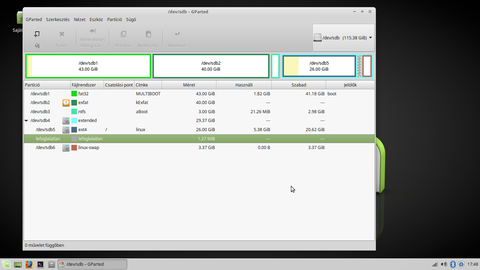
Az sdb1 fat32 , erre windowsból Yumival másolódnak a live iso-k és egyéb iso-k (vírusirtók satöbbi, pl windows telepítő), a Yumit is linuxosok csinálták, syslinuxos bootot tesz az sdb MBR-jébe. A Yumi nagyon kiszolgálja a felhasználót, nem kell beállítások után kutakodnia.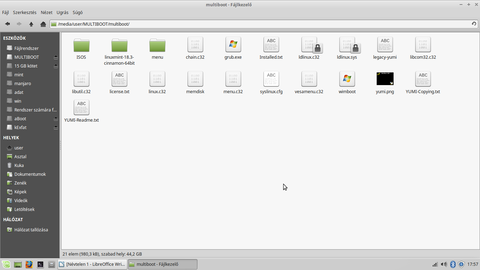
Az sdb2 exFAT, csak winnyózból tudtam megformázni, a linux a /media/user mappába mountolja ha megkérjük rá.
Az sdb3 egy NTFS szükséges rossz ,mert az előzőleg a drive hátsó végébe telepített linux, esetemben L.Mint XFCE 32 bites (bizonyám(!) ... semmi perzisztens baszkurálódás valamelyik live iso-val !) Grub-loaderét ebbe a partícióba telepítettem ez alapján:Installing GRUB2 to a Partition így:sudo chattr -i /boot/grub/i386-pc/core.img
sudo grub-install --target=i386-pc --debug --force /dev/sdb3
sudo chattr +i /boot/grub/i386-pc/core.imgSajnos emiatt került a linux a kiterjesztett partícióba.
Ezután már csak annyi dolgom volt, hogy az sda1 multiboot mappájában található syslinux.cfg fájlba beszúrjam ezt:LABEL grub2
MENU LABEL Grub2
COM32 chain.c32
APPEND boot 3És győztem !


![;]](//cdn.rios.hu/dl/s/v1.gif)
Köszönöm nektek!
Beletelt pár álmatlan éjszakába , mire mindezt a tudatlan fejemmel összebuheráltam.
Külön köszönet colomb2-nek!!
-
#56220
 King Unique
titán
herdsman12
#56217
King Unique
titán
herdsman12
#56217
King Unique
titán
válasz
 herdsman12
#56217
üzenetére
herdsman12
#56217
üzenetére
Azért ez így általánosítva nem feltétlen igaz. Használok multiboot megoldásokat, ahol normál esetben több Linux telepítése után bekerülnek a GRUB-ba az előző disztrók, illetve pl. a Windows is. Ha esetleg nem, akkor rendszerint egy
update-grubmegoldja. De, ha valami egzotikus disztró, aminél esetleg nem működik megfelelően ez, akkor akár manuálisan is hozzá lehet adni a másik rendszer indítóbejegyzését a GRUB-hoz (példa). Illetve itt a topikban is ad találatot a chainloader kulcsszó.Aztán vannak a screenshoton is látható, vagy akár más (példa) "egykattintásos" Boot-Repair programok. Viszont, hogy pl. a mostani esetnél mennyire lenne hatékony egy ilyen, az már más dolog.
-

Rimuru
veterán
Tehat akkor mar megcsinaltad mikor azt kerdezed hogyan lehet megcsinalni?

Syslinuxot nem ajanlom hacsak nem sok ramos gepeket hasznalsz (mondjuk min dupla annyi mint a legnagyobb iso), de ha szeretned ugy hagyni ahogy van akkor grub configba rakj be egy chainloadot a syslinuxra.edit
/etc/grub.d/40_custommenuentry "Syslinux ISOs" {
insmod part_msdos
insmod fat
insmod chain
set root=(hd0,1)
chainloader +1
}Itt ami gond lehet hogy mi a root, mivel tobb lemez is van a gepeken ahol hasznalod, szoval valami ilyesmit is beszurnek, set root helyett, ezen lehet reszelni kellene meg (az biztos hogy te adod meg az UUID-ot!):
insmod search_fs_uuid
search --no-floppy --fs-uuid --set=root UUID-UUID -
Rimuru
veterán
válasz
 -PLevi-
#21955
üzenetére
-PLevi-
#21955
üzenetére
os-prober csomag telepítve van? az a másik rendszer felismeréséhez szükséges vagy akár kézzel is megadhatod, pl /etc/grub/40_custom fájlban, ahol a hd0,3 a lemezt és a partíciót jelöli (és utána megint frissíteni kell a a grubot):
menuentry "Windows XP" --class windows --class os {
set root="(hd0,3)"
chainloader +1
}Jester01: Telepítő rákérdez, legalábbis az expert.
-

Vladi
nagyúr
válasz
 Sub-ZeRo
#19361
üzenetére
Sub-ZeRo
#19361
üzenetére
Ez a gurb és a telepítő dolga. Nincs köze a particionáláshoz. Megcsinálod a partíciókat. Mindegy hogyan. Felteszed az egyiket, aztán a másik rendszert.
A telepítőnek kell(ene) látni, hogy van már ott egy másik os. a windows 100%, hogy nem csinálja meg neked, lényegében nem vesz róla tudomást. az mbr-be beírta a cuccait és kész. Onnantól a grub már nem tud indulni.Ezért szoktuk először a wint telepíteni, utána a linuxot. Mert ez általában észreveszi, hogy van egy másik os. Utána a grub bejegyzi magának. Általában annyit csinál csak, hogy elindítja a másik os rendszerbetöltőjét (chainloader) legalább is grub1 még így csinálta. Most grub 2 nem tudom pontosan mit csinál. Nekem fedora telepítő be szokta jól állítani.
(#19362) CPT.Pirk
Szerintem az a kulcsa, hogy nem hagytam már neki helyet. A teljes ssd ki volt osztva partícióknak, minden hely foglalt. Akkor kénytelen betelepülni az első sda1 partícióra. (c: )(#19363) joecontra:
Igen, így is lehet. w7 alatt ez hogy működik?
(#19370) sh4d0w:
Nehezen tudom elhinni. Ha települ a lemezre, akkor kezelni is tudja. Ergó látja a másik partíciót és látja, hogy van ott valami. anaconda erre azt mondja: other os és kész.
-
#8600
 Nkboy
senior tag
Sweet Lou 6
#8599
Nkboy
senior tag
Sweet Lou 6
#8599
Nkboy
senior tag
válasz
 Sweet Lou 6
#8599
üzenetére
Sweet Lou 6
#8599
üzenetére
Fel!
### BEGIN /etc/grub.d/30_os-prober ###
menuentry "Windows 7 (loader) (on /dev/sdb1)" {
insmod ntfs
set root=(hd1,1)
search --no-floppy --fs-uuid --set e6800fc8800f9e65
chainloader +1
}
### END /etc/grub.d/30_os-prober ### -

sirály12
őstag
Ez lenne az:
# Modified by YaST2. Last modification on Sat Jun 6 12:47:10 CEST 2009
default 0
timeout 8
##YaST - generic_mbr
gfxmenu (hd0,2)/message###Don't change this comment - YaST2 identifier: Original name: linux###
title openSUSE 11.1 - 2.6.27.21-0.1
root (hd0,2)
kernel /vmlinuz-2.6.27.21-0.1-default root=/dev/disk/by-id/raid-nvidia_bbcccged-part10 splash=silent showopts vga=0x346
initrd /initrd-2.6.27.21-0.1-default###Don't change this comment - YaST2 identifier: Original name: failsafe###
title Failsafe -- openSUSE 11.1 - 2.6.27.21-0.1
root (hd0,2)
kernel /vmlinuz-2.6.27.21-0.1-default root=/dev/disk/by-id/raid-nvidia_bbcccged-part10 showopts ide=nodma apm=off noresume edd=off powersaved=off nohz=off highres=off processor.max_cstate=1 x11failsafe vga=0x346
initrd /initrd-2.6.27.21-0.1-default###Don't change this comment - YaST2 identifier: Original name: windows 1###
title windows 1
rootnoverify (hd0,0)
chainloader +1###Don't change this comment - YaST2 identifier: Original name: windows 2###
title windows 2
rootnoverify (hd0,0)
chainloader +1Egyúttal megnéztem azt is mit ír ki ha benne van a tárolós vinyó is.
Could not find /dev/disk/by-id/raid -nvidia-bbcccged-part10.
Want me to fall back to /dev/mapper/nvidia-bbcccged-part10?(Y/n)És itt ha yes-t, ha no-t nyomok, akkor is ez a válasz:
not found -- exiting to /bin/sh
$ -

zodo
nagyúr
De azt nem értem, miért állítja az editor ,hogy az ubi a default amikor nem.
Vagy tényleg ,ássam el magam?Légyszi ,nézz rá a menü listámra:
# menu.lst - See: grub(8), info grub, update-grub(8)
# grub-install(8), grub-floppy(8),
# grub-md5-crypt, /usr/share/doc/grub
# and /usr/share/doc/grub-doc/.## default num
# Set the default entry to the entry number NUM. Numbering starts from 0, and
# the entry number 0 is the default if the command is not used.
#
# You can specify 'saved' instead of a number. In this case, the default entry
# is the entry saved with the command 'savedefault'.
# WARNING: If you are using dmraid do not use 'savedefault' or your
# array will desync and will not let you boot your system.
default 0## timeout sec
# Set a timeout, in SEC seconds, before automatically booting the default entry
# (normally the first entry defined).
timeout 10## hiddenmenu
# Hides the menu by default (press ESC to see the menu)
#hiddenmenu# Pretty colours
#color cyan/blue white/blue## password ['--md5'] passwd
# If used in the first section of a menu file, disable all interactive editing
# control (menu entry editor and command-line) and entries protected by the
# command 'lock'
# e.g. password topsecret
# password --md5 $1$gLhU0/$aW78kHK1QfV3P2b2znUoe/
# password topsecret#
# examples
#
# title Windows 95/98/NT/2000
# root (hd0,0)
# makeactive
# chainloader +1
#
# title Linux
# root (hd0,1)
# kernel /vmlinuz root=/dev/hda2 ro
##
# Put static boot stanzas before and/or after AUTOMAGIC KERNEL LIST### BEGIN AUTOMAGIC KERNELS LIST
## lines between the AUTOMAGIC KERNELS LIST markers will be modified
## by the debian update-grub script except for the default options below## DO NOT UNCOMMENT THEM, Just edit them to your needs
## ## Start Default Options ##
## default kernel options
## default kernel options for automagic boot options
## If you want special options for specific kernels use kopt_x_y_z
## where x.y.z is kernel version. Minor versions can be omitted.
## e.g. kopt=root=/dev/hda1 ro
## kopt_2_6_8=root=/dev/hdc1 ro
## kopt_2_6_8_2_686=root=/dev/hdc2 ro
# kopt=root=UUID=A86C216A6C21348A loop=/ubuntu/disks/root.disk ro ROOTFLAGS=syncio## default grub root device
## e.g. groot=(hd0,0)
# groot=()/ubuntu/disks## should update-grub create alternative automagic boot options
## e.g. alternative=true
## alternative=false
# alternative=true## should update-grub lock alternative automagic boot options
## e.g. lockalternative=true
## lockalternative=false
# lockalternative=false## additional options to use with the default boot option, but not with the
## alternatives
## e.g. defoptions=vga=791 resume=/dev/hda5
# defoptions=quiet splash## should update-grub lock old automagic boot options
## e.g. lockold=false
## lockold=true
# lockold=false## Xen hypervisor options to use with the default Xen boot option
# xenhopt=## Xen Linux kernel options to use with the default Xen boot option
# xenkopt=console=tty0## altoption boot targets option
## multiple altoptions lines are allowed
## e.g. altoptions=(extra menu suffix) extra boot options
## altoptions=(recovery) single
# altoptions=(recovery mode) single## controls how many kernels should be put into the menu.lst
## only counts the first occurence of a kernel, not the
## alternative kernel options
## e.g. howmany=all
## howmany=7
# howmany=all## should update-grub create memtest86 boot option
## e.g. memtest86=true
## memtest86=false
# memtest86=true## should update-grub adjust the value of the default booted system
## can be true or false
# updatedefaultentry=false## should update-grub add savedefault to the default options
## can be true or false
# savedefault=false## ## End Default Options ##
title Ubuntu 8.10, kernel 2.6.27-9-generic
root ()/ubuntu/disks
kernel /boot/vmlinuz-2.6.27-9-generic root=UUID=A86C216A6C21348A loop=/ubuntu/disks/root.disk ro ROOTFLAGS=syncio quiet splash
initrd /boot/initrd.img-2.6.27-9-generictitle Ubuntu 8.10, kernel 2.6.27-9-generic (recovery mode)
root ()/ubuntu/disks
kernel /boot/vmlinuz-2.6.27-9-generic root=UUID=A86C216A6C21348A loop=/ubuntu/disks/root.disk ro ROOTFLAGS=syncio single
initrd /boot/initrd.img-2.6.27-9-generictitle Ubuntu 8.10, kernel 2.6.27-7-generic
root ()/ubuntu/disks
kernel /boot/vmlinuz-2.6.27-7-generic root=UUID=A86C216A6C21348A loop=/ubuntu/disks/root.disk ro ROOTFLAGS=syncio quiet splash
initrd /boot/initrd.img-2.6.27-7-generictitle Ubuntu 8.10, kernel 2.6.27-7-generic (recovery mode)
root ()/ubuntu/disks
kernel /boot/vmlinuz-2.6.27-7-generic root=UUID=A86C216A6C21348A loop=/ubuntu/disks/root.disk ro ROOTFLAGS=syncio single
initrd /boot/initrd.img-2.6.27-7-generictitle Ubuntu 8.10, memtest86+
root ()/ubuntu/disks
kernel /boot/memtest86+.bin### END DEBIAN AUTOMAGIC KERNELS LIST
# This is a divider, added to separate the menu items below from the Debian
# ones.
title Other operating systems:
root# This entry automatically added by the Debian installer for a non-linux OS
# on /dev/sda1
title Microsoft Windows XP Professional - magyar
root (hd0,0)
savedefault
chainloader +1 -
zodo
nagyúr
Most ,ezt nem értem.

grub menü listában így szerepelnek a rendszereim:
# title Windows 95/98/NT/2000
# root (hd0,0)
# makeactive
# chainloader +1
#
# title Linux
# root (hd0,1)
# kernel /vmlinuz root=/dev/hda2 roés a Qgrubeditor-ban ,pedig ez a kép fogad:
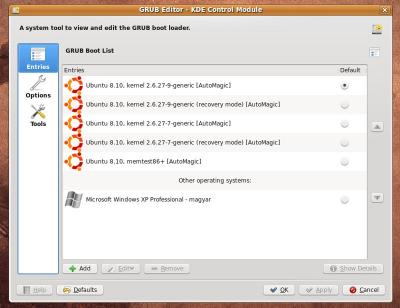
Bekapcsoláskor a menüben tuti,hogy az xp első helyen van és índul is ,mint alapértelmezett.
Akkor most mit is kéne tennem,hogy az ubi legyen az alapértelmezett ? -

VaZso
senior tag
"# title Windows 95/98/NT/2000
# root (hd0,0) Itt írjam át a (hd0,0)-t ,(hd1,1)-re ?
# makeactive
# chainloader +1
#"Igen, próbáld meg úgy.
Az első egyes a második merevlemezt jelenti benne (0-val kezdődik), a második egyes pedig az első partíciót (1-gyel kezdődik).Tehát a második merevlemez első partícióját jelöli, innen bootolnia kéne.
Annyit csinálj még, hogy kiveszed a sorok elől a kettőskeresztet.
(Ez jelöli a kommentet - vagyis megjegyzést -, mivel a menu.lst-hez eredendően példaként fűzték hozzá).Azt is megteheted, hogy egyszerűen a többi title (...) bejegyzés alá bemásolod # nélkül a sorokat (egyébként a fileban elfoglalt sorrend szerint jeleníti meg a grub induláskor őket, tehát változtathatsz a sorrenden, ha valami nem tetszik).
-
zodo
nagyúr
Most így nézz ki a menu.lst-m
# menu.lst - See: grub(8), info grub, update-grub(8)
# grub-install(8), grub-floppy(8),
# grub-md5-crypt, /usr/share/doc/grub
# and /usr/share/doc/grub-doc/.## default num
# Set the default entry to the entry number NUM. Numbering starts from 0, and
# the entry number 0 is the default if the command is not used.
#
# You can specify 'saved' instead of a number. In this case, the default entry
# is the entry saved with the command 'savedefault'.
# WARNING: If you are using dmraid do not use 'savedefault' or your
# array will desync and will not let you boot your system.
default 0## timeout sec
# Set a timeout, in SEC seconds, before automatically booting the default entry
# (normally the first entry defined).
timeout 3## hiddenmenu
# Hides the menu by default (press ESC to see the menu)
hiddenmenu# Pretty colours
#color cyan/blue white/blue## password ['--md5'] passwd
# If used in the first section of a menu file, disable all interactive editing
# control (menu entry editor and command-line) and entries protected by the
# command 'lock'
# e.g. password topsecret
# password --md5 $1$gLhU0/$aW78kHK1QfV3P2b2znUoe/
# password topsecret#
# examples
#
# title Windows 95/98/NT/2000
# root (hd0,0) Itt írjam át a (hd0,0)-t ,(hd1,1)-re ?
# makeactive
# chainloader +1
#
# title Linux
# root (hd0,1)
# kernel /vmlinuz root=/dev/hda2 ro
##
# Put static boot stanzas before and/or after AUTOMAGIC KERNEL LIST### BEGIN AUTOMAGIC KERNELS LIST
## lines between the AUTOMAGIC KERNELS LIST markers will be modified
## by the debian update-grub script except for the default options below## DO NOT UNCOMMENT THEM, Just edit them to your needs
## ## Start Default Options ##
## default kernel options
## default kernel options for automagic boot options
## If you want special options for specific kernels use kopt_x_y_z
## where x.y.z is kernel version. Minor versions can be omitted.
## e.g. kopt=root=/dev/hda1 ro
## kopt_2_6_8=root=/dev/hdc1 ro
## kopt_2_6_8_2_686=root=/dev/hdc2 ro
# kopt=root=UUID=fe346283-11f9-47c0-8a3b-e4bcfbf7734e ro## default grub root device
## e.g. groot=(hd0,0)
# groot=fe346283-11f9-47c0-8a3b-e4bcfbf7734e## should update-grub create alternative automagic boot options
## e.g. alternative=true
## alternative=false
# alternative=true## should update-grub lock alternative automagic boot options
## e.g. lockalternative=true
## lockalternative=false
# lockalternative=false## additional options to use with the default boot option, but not with the
## alternatives
## e.g. defoptions=vga=791 resume=/dev/hda5
# defoptions=quiet splash## should update-grub lock old automagic boot options
## e.g. lockold=false
## lockold=true
# lockold=false## Xen hypervisor options to use with the default Xen boot option
# xenhopt=## Xen Linux kernel options to use with the default Xen boot option
# xenkopt=console=tty0## altoption boot targets option
## multiple altoptions lines are allowed
## e.g. altoptions=(extra menu suffix) extra boot options
## altoptions=(recovery) single
# altoptions=(recovery mode) single## controls how many kernels should be put into the menu.lst
## only counts the first occurence of a kernel, not the
## alternative kernel options
## e.g. howmany=all
## howmany=7
# howmany=all## should update-grub create memtest86 boot option
## e.g. memtest86=true
## memtest86=false
# memtest86=true## should update-grub adjust the value of the default booted system
## can be true or false
# updatedefaultentry=false## should update-grub add savedefault to the default options
## can be true or false
# savedefault=false## ## End Default Options ##
title Ubuntu 8.10, kernel 2.6.27-9-generic
uuid fe346283-11f9-47c0-8a3b-e4bcfbf7734e
kernel /boot/vmlinuz-2.6.27-9-generic root=UUID=fe346283-11f9-47c0-8a3b-e4bcfbf7734e ro quiet splash
initrd /boot/initrd.img-2.6.27-9-generic
quiettitle Ubuntu 8.10, kernel 2.6.27-9-generic (recovery mode)
uuid fe346283-11f9-47c0-8a3b-e4bcfbf7734e
kernel /boot/vmlinuz-2.6.27-9-generic root=UUID=fe346283-11f9-47c0-8a3b-e4bcfbf7734e ro single
initrd /boot/initrd.img-2.6.27-9-generictitle Ubuntu 8.10, kernel 2.6.27-7-generic
uuid fe346283-11f9-47c0-8a3b-e4bcfbf7734e
kernel /boot/vmlinuz-2.6.27-7-generic root=UUID=fe346283-11f9-47c0-8a3b-e4bcfbf7734e ro quiet splash
initrd /boot/initrd.img-2.6.27-7-generic
quiettitle Ubuntu 8.10, kernel 2.6.27-7-generic (recovery mode)
uuid fe346283-11f9-47c0-8a3b-e4bcfbf7734e
kernel /boot/vmlinuz-2.6.27-7-generic root=UUID=fe346283-11f9-47c0-8a3b-e4bcfbf7734e ro single
initrd /boot/initrd.img-2.6.27-7-generictitle Ubuntu 8.10, memtest86+
uuid fe346283-11f9-47c0-8a3b-e4bcfbf7734e
kernel /boot/memtest86+.bin
quiet### END DEBIAN AUTOMAGIC KERNELS LIST
-
VaZso
senior tag
Meg lehet oldani.
Bár most nem tiszta előttem, hogy végülis melyik vinyóra települt a grub.
(Azt gondolom, hogy a bootsorrend változtatásával tudnod kéne "váltani" a rendszerek között.)A Windows indításához próbáld meg szerkeszteni a /boot/grub/menu.lst filet.
Ha minden igaz, ezt kell hozzáfűzni, hogy indítható legyen:
title windows
root (hd1,1)
makeactive
chainloader +1 -
Vladi
nagyúr
válasz
 CPT.Pirk
#6698
üzenetére
CPT.Pirk
#6698
üzenetére
Igen. Elég oda irányítani.
Kb:title Windows xp
chainloader (hd0,0)+1Persze helyesen kell megadni a hd részt. Szerintem hd2,0 -lesz.
Illetve lehet, hogy átmapolás is kell majd.
Leírás. Próbálgasd. Berakod egy új bejegyzésként a grub menu.lst-be. Nagyon elrontani sem lehet, max nem bootol onnan. -
#4501
Core2duo6600
veterán
blaces
#4500
Core2duo6600
veterán
text editorram nyisd ki a /boot/grub ban a menu -t
és írd át
hogy melyik a default, azt számmal tudod kijelolni, a 0 a legfelső és lefele 1 el novekszik, ami meg nem kell, swap meg ilyenek azt töröld kiA felsorolási sorrend nem határozza meg., hogy melyik induljon elsőnek
ahhoz hogy beírjad a grub ba, hogy a win -t is el tudja indítani ehhez tudnod kell, hogy a win melyik partición van, tehát hányadikon
clainloader a fontos rész ebbúl a szempontból
hd 0,0 hd 0,1 stb.... adja meg azt, hogy hányadikon van a windowsod
az első 0 magát a winyod jelenti a második meg a partició sorszámátAmennyiben az első akkor valami ilyesmit kell beírnod
title Microsoft Windows Xp
rootnoverify (hd0,0)
chainloader (hd0,0)+1Biztos, hogy volt lehetőség install közben a bootloader szerkesztésére
-
#4323
Core2duo6600
veterán
Lamair
#4321
Core2duo6600
veterán
Beállítot a linuxos winyod bootnak
ill a yastban a bootloadernél azt mondod neki, hogy mbr be települjön
majd a /boot/grub/menu -t valahogy így modosítod
Persze a hdd ék ill. particiók elnevezését a nálad érvényben lévőre kell változtatni, azt szemelött tartva, hogy ahol a grub van minden esetben az a 0 ik particiótitle openSUSE 10.3 - 2.6.22.13-0.3
root (hd0,1)
kernel /boot/vmlinuz-2.6.22.13-0.3-bigsmp root=/dev/disk/by-id/scsi-SATA_SAMSUNG_HD400LJS0H2J1NP900708-part2 vga=0x317 resume=/dev/sda1 splash=silent showopts
initrd /boot/initrd-2.6.22.13-0.3-bigsmptitle Microsoft Windows Vista X64
root (hd1,0)
chainloader +1title Microsoft Windows Xp
rootnoverify (hd0,0)
map (hd0) (hd2)
map (hd2) (hd0)
chainloader (hd2,0)+1 -
#3941
Core2duo6600
veterán
#25954560
#3938
Core2duo6600
veterán
válasz
 #25954560
#3938
üzenetére
#25954560
#3938
üzenetére
Xp esetében nálam így van :
title Microsoft Windows Xp
rootnoverify (hd0,0)
map (hd0) (hd2)
map (hd2) (hd0)
chainloader (hd2,0)+1Amikor még ezt összehoztam nem pontosan vágtam, hogy mit miért, csak találtam egy forumban valami hasonlót és addig állítgattam amig jó nem lett,
Ugyanezzel az elgondolással a vista nem indul el
Az van a 1 es mig a linux a 0 as winyon -
#3937
Core2duo6600
veterán
Core2duo6600
#3933
Core2duo6600
veterán
válasz
Core2duo6600
#3933
üzenetére
Hátha mást is érdekel közben rájöttem :
Be kell írni a menu.lst be :title Microsoft Windows Vista X64
root (hd1,0)
chainloader +1Ezt
Akkor ha a 2-ik HDD én van a win vista
Hogy a yastal hogy kell megcsináltatni azt nem tudom, mert az mindenáron root bejegyzést átírja rootnoverify re
De így müködik -
válasz
 ngabor2
#2359
üzenetére
ngabor2
#2359
üzenetére
Próbáltam kiadni a parancsot de nem enged hozzáférni
# menu.lst - See: grub(8), info grub, update-grub(8)
# grub-install(8), grub-floppy(8),
# grub-md5-crypt, /usr/share/doc/grub
# and /usr/share/doc/grub-doc/.
## default 3
# Set the default entry to the entry number NUM. Numbering starts from 0, and
# the entry number 0 is the default if the command is not used.
#
# You can specify 'saved' instead of a number. In this case, the default entry
# is the entry saved with the command 'savedefault'.
# WARNING: If you are using dmraid do not change this entry to 'saved' or your
# array will desync and will not let you boot your system.
default 0
## timeout sec
# Set a timeout, in SEC seconds, before automatically booting the default entry
# (normally the first entry defined).
timeout 3
## hiddenmenu
# Hides the menu by default (press ESC to see the menu)
#hiddenmenu
# Pretty colours
#color cyan/blue white/blue
## password ['--md5' passwd
# If used in the first section of a menu file, disable all interactive editing
# control (menu entry editor and command-line) and entries protected by the
# command 'lock'
# e.g. password topsecret
# password --md5 $1$gLhU0/$aW78kHK1QfV3P2b2znUoe/
# password topsecret
#
# examples
#
# title Windows 95/98/NT/2000
# root (hd0,0)
# makeactive
# chainloader +1
#
# title Linux
# root (hd0,1)
# kernel /vmlinuz root=/dev/hda2 ro
#
#
# Put static boot stanzas before and/or after AUTOMAGIC KERNEL LIST
### BEGIN AUTOMAGIC KERNELS LIST
## lines between the AUTOMAGIC KERNELS LIST markers will be modified
## by the debian update-grub script except for the default options below
## DO NOT UNCOMMENT THEM, Just edit them to your needs
## ## Start Default Options ##
## default kernel options
## default kernel options for automagic boot options
## If you want special options for specific kernels use kopt_x_y_z
## where x.y.z is kernel version. Minor versions can be omitted.
## e.g. kopt=root=/dev/hda1 ro
## kopt_2_6_8=root=/dev/hdc1 ro
## kopt_2_6_8_2_686=root=/dev/hdc2 ro
# kopt=root=/dev/hda2 ro
## default grub root device
## e.g. groot=(hd0,0)
# groot=(hd0,1)
## should update-grub create alternative automagic boot options
## e.g. alternative=true
## alternative=false
# alternative=true
## should update-grub lock alternative automagic boot options
## e.g. lockalternative=true
## lockalternative=false
# lockalternative=false
## additional options to use with the default boot option, but not with the
## alternatives
## e.g. defoptions=vga=791 resume=/dev/hda5
# defoptions=quiet splash
## altoption boot targets option
## multiple altoptions lines are allowed
## e.g. altoptions=(extra menu suffix) extra boot options
## altoptions=(recovery mode) single
# altoptions=(recovery mode) single
## controls how many kernels should be put into the menu.lst
## only counts the first occurence of a kernel, not the
## alternative kernel options
## e.g. howmany=all
## howmany=7
# howmany=all
## should update-grub create memtest86 boot option
## e.g. memtest86=true
## memtest86=false
# memtest86=true
## should update-grub adjust the value of the default booted system
## can be true or false
# updatedefaultentry=false
## ## End Default Options ##
title Ubuntu, kernel 2.6.15-27-386
root (hd0,1)
kernel /boot/vmlinuz-2.6.15-27-386 root=/dev/hda2 ro quiet splash
initrd /boot/initrd.img-2.6.15-27-386
savedefault
boot
title Ubuntu, kernel 2.6.15-27-386 (recovery mode)
root (hd0,1)
kernel /boot/vmlinuz-2.6.15-27-386 root=/dev/hda2 ro single
initrd /boot/initrd.img-2.6.15-27-386
boot
title Ubuntu, kernel 2.6.15-23-386
root (hd0,1)
kernel /boot/vmlinuz-2.6.15-23-386 root=/dev/hda2 ro quiet splash
initrd /boot/initrd.img-2.6.15-23-386
savedefault
boot
title Ubuntu, kernel 2.6.15-23-386 (recovery mode)
root (hd0,1)
kernel /boot/vmlinuz-2.6.15-23-386 root=/dev/hda2 ro single
initrd /boot/initrd.img-2.6.15-23-386
boot
title Ubuntu, memtest86+
root (hd0,1)
kernel /boot/memtest86+.bin
boot
### END DEBIAN AUTOMAGIC KERNELS LIST
# This is a divider, added to separate the menu items below from the Debian
# ones.
title Other operating systems:
root
# This entry automatically added by the Debian installer for a non-linux OS
# on /dev/hda1
title Microsoft Windows XP Professional - magyar
root (hd0,0)
savedefault
makeactive
chainloader +1
# This entry automatically added by the Debian installer for a non-linux OS
# on /dev/hdd1
title Microsoft Windows XP Professional - magyar
root (hd1,0)
savedefault
makeactive
map (hd0) (hd1)
map (hd1) (hd0)
chainloader +1
[Szerkesztve] -

mr_knight
senior tag
Huh.
 Ez nekem kínai.
  Inkább bemásolom az egészet. És sorry előre is a hosszú szövegnek, de, ha megkapom a választ 5 percen belül akkor kitudom törölni... Na hajrá !
# menu.lst - See: grub(8), info grub, update-grub(8)
# grub-install(8), grub-floppy(8),
# grub-md5-crypt, /usr/share/doc/grub
# and /usr/share/doc/grub-doc/.
## default num
# Set the default entry to the entry number NUM. Numbering starts from 0, and
# the entry number 0 is the default if the command is not used.
#
# You can specify 'saved' instead of a number. In this case, the default entry
# is the entry saved with the command 'savedefault'.
default 0
## timeout sec
# Set a timeout, in SEC seconds, before automatically booting the default entry
# (normally the first entry defined).
timeout 3
## hiddenmenu
# Hides the menu by default (press ESC to see the menu)
#hiddenmenu
# Pretty colours
#color cyan/blue white/blue
## password ['--md5' passwd
# If used in the first section of a menu file, disable all interactive editing
# control (menu entry editor and command-line) and entries protected by the
# command 'lock'
# e.g. password topsecret
# password --md5 $1$gLhU0/$aW78kHK1QfV3P2b2znUoe/
# password topsecret
#
# examples
#
# title Windows 95/98/NT/2000
# root (hd0,0)
# makeactive
# chainloader +1
#
# title Linux
# root (hd0,1)
# kernel /vmlinuz root=/dev/hda2 ro
#
#
# Put static boot stanzas before and/or after AUTOMAGIC KERNEL LIST
### BEGIN AUTOMAGIC KERNELS LIST
## lines between the AUTOMAGIC KERNELS LIST markers will be modified
## by the debian update-grub script except for the default options below
## DO NOT UNCOMMENT THEM, Just edit them to your needs
## ## Start Default Options ##
## default kernel options
## default kernel options for automagic boot options
## If you want special options for specifiv kernels use kopt_x_y_z
## where x.y.z is kernel version. Minor versions can be omitted.
## e.g. kopt=root=/dev/hda1 ro
# kopt=root=/dev/hdb3 ro
## default grub root device
## e.g. groot=(hd0,0)
# groot=(hd1,2)
## should update-grub create alternative automagic boot options
## e.g. alternative=true
## alternative=false
# alternative=true
## should update-grub lock alternative automagic boot options
## e.g. lockalternative=true
## lockalternative=false
# lockalternative=false
## altoption boot targets option
## multiple altoptions lines are allowed
## e.g. altoptions=(extra menu suffix) extra boot options
## altoptions=(recovery mode) single
# altoptions=(recovery mode) single
## nonaltoption boot targets option
## This option controls options to pass to only the
## primary kernel menu item.
## You can have ONLY one nonaltoptions line
# nonaltoptions=quiet splash
## controls how many kernels should be put into the menu.lst
## only counts the first occurence of a kernel, not the
## alternative kernel options
## e.g. howmany=all
## howmany=7
# howmany=all
## should update-grub create memtest86 boot option
## e.g. memtest86=true
## memtest86=false
# memtest86=true
## ## End Default Options ##
title Ubuntu, kernel 2.6.12-9-386
root (hd1,2)
kernel /boot/vmlinuz-2.6.12-9-386 root=/dev/hdb3 ro quiet splash
initrd /boot/initrd.img-2.6.12-9-386
savedefault
boot
title Ubuntu, kernel 2.6.12-9-386 (recovery mode)
root (hd1,2)
kernel /boot/vmlinuz-2.6.12-9-386 root=/dev/hdb3 ro single
initrd /boot/initrd.img-2.6.12-9-386
boot
title Ubuntu, memtest86+
root (hd1,2)
kernel /boot/memtest86+.bin
boot
### END DEBIAN AUTOMAGIC KERNELS LIST
# This is a divider, added to separate the menu items below from the Debian
# ones.
title Other operating systems:
root
# This entry automatically added by the Debian installer for a non-linux OS
# on /dev/hda1
title Microsoft Windows XP Professional - magyar
root (hd0,0)
savedefault
makeactive
chainloader +1 -
mr_knight
senior tag
A Timeout még megy, de a többit azt nem értem
Így kezdődik a menu.lst:
# menu.lst - See: grub(8), info grub, update-grub(8)
# grub-install(8), grub-floppy(8),
# grub-md5-crypt, /usr/share/doc/grub
# and /usr/share/doc/grub-doc/.
## default num
# Set the default entry to the entry number NUM. Numbering starts from 0, and
# the entry number 0 is the default if the command is not used.
#
# You can specify 'saved' instead of a number. In this case, the default entry
# is the entry saved with the command 'savedefault'.
default 0
És így végződik az egész dokument:
# This entry automatically added by the Debian installer for a non-linux OS
# on /dev/hda1
title Microsoft Windows XP Professional - magyar
root (hd0,0)
savedefault
makeactive
chainloader +1
Most akkor +1et kell írni a Defaulthoz ?
-

escie
őstag
mivel nincs lilo sem.
grubbal bootol az uhu, márha az 1.1-et használod...
a /boot/grub/menu.lst -et kell szerkesztened. azt nem tudom megmondani, hogy hogy, nincs windowsom. de a kulcsszó a chainloader. dobd fel a témát a nagy linux topicban, hátha...
a hanggal kapcsolatban pedig nézz szét az uhulinux.hu-n a tudásbázisban...


![;]](http://cdn.rios.hu/dl/s/v1.gif)


 Ez nekem kínai.
  Inkább bemásolom az egészet. És sorry előre is a hosszú szövegnek, de, ha megkapom a választ 5 percen belül akkor kitudom törölni... Na hajrá !


Új hozzászólás Aktív témák
A topik célja: Segítségnyújtás a Linux disztribúciókkal még csak ismerkedők számára. A szerveres kérdések nem ebbe a topicba tartoznak.
Kérdés előtt olvasd el a topik összefoglalóját!
Haladó Linuxos kérdések topikja.
Linux felhasználók OFF topikja
Milyen program ami... [link]
Shell script kérdésekkel látogassatok el a topikjába
- Teszt Már csak két hónap van hátra a Windows 10 nyugdíjazásáig, ideje előrelépni
- Teszt [Linux] Vanilla OS, egy Debian alapú immutable operációs rendszer
- Teszt [Linux] Aeon Desktop, egy immutable operációs rendszer az OpenSUSE-tól
- Teszt [Linux] A Flatpak
- Bejegyzés MS Office365 Linuxon
- Bejegyzés [Linux] Futtassunk bármely disztrót a terminálunkban
- Bejegyzés Alpine Linux telepítés mindenféle low-end dologra
- Hír Zöld utat adott a nyílt forráskódú Linux meghajtóknak az NVIDIA
- Microsoft Excel topic
- sziku69: Szólánc.
- ESET NOD32 Antivirus / Smart Security
- Azonnali informatikai kérdések órája
- Milyen routert?
- CADA, Polymobil, és más építőkockák
- Anglia - élmények, tapasztalatok
- Luck Dragon: Asszociációs játék. :)
- Vicces képek
- Kínai és egyéb olcsó órák topikja
- További aktív témák...
- LG 27UL550-W - 27" IPS / 3840x2160 4K / 60Hz 5ms / HDR10 / AMD FreeSync
- Playstation 4 Fat 500 GB + kontroller 6 hó garancia, számlával!
- Lenovo Thinkbook 16 G6 WUXGA IPS Ryzen7 7730U 16GB 512GB SSD Radeon RX Vega8 Win11 Pro Garancia
- HP ProBook 650 G8 Intel i5-1145G7 32GB 512GB magyarbill 1 év garancia
- Apple iPhone 17 Pro Max 256GB,Uj, Bontatlan,36 hónap garancia
Állásajánlatok

Cég: Laptopműhely Bt.
Város: Budapest

Cég: BroadBit Hungary Kft.
Város: Budakeszi