
- MasterDeeJay: Low budget (50.000 forint) light gémer gép összerakása
- gban: Ingyen kellene, de tegnapra
- Nyuszit otthonra, kedvencnek!
- D1Rect: Nagy "hülyétkapokazapróktól" topik
- Luck Dragon: Asszociációs játék. :)
- GoodSpeed: Anker Charger (140W, 4-Port, PD 3.1) laptop, mobil, tablet töltő
- sziku69: Szólánc.
- sziku69: Fűzzük össze a szavakat :)
- Geri Bátyó: Agglegénykonyha 15 – Néhány tavaszias recept
- GoodSpeed: ASUS RT-BE92U WiFi 7 router a felsőházból
-
1500 - 1401
3448 - 3401 3400 - 3301 3300 - 3201 3200 - 3101 3100 - 3001 3000 - 2901 2900 - 2801 2800 - 2701 2700 - 2601 2600 - 2501 2500 - 2401 2400 - 2301 2300 - 2201 2200 - 2101 2100 - 2001 2000 - 1901 1900 - 1801 1800 - 1701 1700 - 1601 1600 - 1501 1500 - 1401 1400 - 1301 1300 - 1201 1200 - 1101 1100 - 1001 1000 - 901 900 - 801 800 - 701 700 - 601 600 - 501 500 - 401 400 - 301 300 - 201 200 - 101 100 - 1
-
Fórumok
LOGOUT - lépj ki, lépj be!
LOGOUT reakciók Monologoszféra FototrendGAMEPOD - játék fórumok
PC játékok Konzol játékok MobiljátékokPROHARDVER! - hardver fórumok
Notebookok TV & Audió Digitális fényképezés Alaplapok, chipsetek, memóriák Processzorok, tuning Hűtés, házak, tápok, modding Videokártyák Monitorok Adattárolás Multimédia, életmód, 3D nyomtatás Nyomtatók, szkennerek Tabletek, E-bookok PC, mini PC, barebone, szerver Beviteli eszközök Egyéb hardverek PROHARDVER! BlogokMobilarena - mobil fórumok
Okostelefonok Mobiltelefonok Okosórák Autó+mobil Üzlet és Szolgáltatások Mobilalkalmazások Tartozékok, egyebek Mobilarena blogokIT café - infotech fórumok
Infotech Hálózat, szolgáltatók OS, alkalmazások SzoftverfejlesztésFÁRADT GŐZ - közösségi tér szinte bármiről
Tudomány, oktatás Sport, életmód, utazás, egészség Kultúra, művészet, média Gazdaság, jog Technika, hobbi, otthon Társadalom, közélet Egyéb Lokál PROHARDVER! interaktív
Új hozzászólás Aktív témák
-
 vlevi
nagyúr
vlevi
nagyúr
Van már 17074.1002 is.
Lesz még mit faragni rajta.
Nem tudom, hogy a start menün akartak-e reszelni, vagy sem, de sikerült
Néhány ikonom pl. ilyen szép lett.
Nem számít, hogy leszedem, és újra felrakom, akkor is ilyen marad.
És természetesen, ha rákkatintok, nem indul.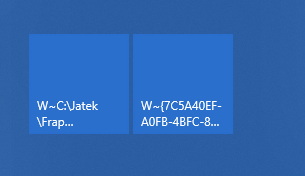
-
 westlake
félisten
westlake
félisten
Van már 17074.1002 is.
-
 #38742016
törölt tag
#38742016
törölt tag
Sziasztok. Az mitől lehet, hogy nem tudom engedélyezni az insider módot? Gépházban rákattintok a kezdés gombra, végigmegyek a lépéseken, újraindítom, és mintha semmit se csináltam volna, kezdhetem az elejéről. Ezt megcsináltam már legalább 10x, semmi se változott, egyszerűen nem lehet bekapcsolni.
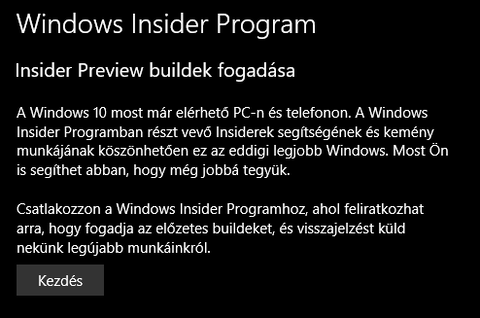
Most 16299.192 verzió van fent.
-
vlevi
nagyúr
Edge-ben nem bírnak szabadulni attól, hogy amikor valami új tartalmat jelenít meg, pl. lapot vált a böngésző, vagy a pdf olvasó kilép a teljesképernős módból, akkor ne villantson félmásodpercnyi vakító hófehéret a pofámba.
Amúgy, továbbra is indokolatlannak tartom UWP alatt, hogy egérrel kezelve nem tudok az egyik helyről azonnal átkattintani a másik helyre, mert az első kattintás csak bezárja az egyik helyet, és csak a következő nyitja meg. Ez egy érintőképernős rendszeren teljesen érthető, mert ott csak úgy tudok kilépni egy popupból, ha a képernyő másik részét megérintem, de egérrel ez zavaró. Főleg úgy zavaró, hogy ez csak az UWP felületen működik így, a hagyományos winapi alkalmazásoknál, legyen az akár a windows intéző, a popupból a címsorba kattintva rögtön belép a címsorba, és már írhatok is oda.
Ezzelszemben az Edge-ben, a kedvencek popupból a címsorba kattintva csak bezárja a kedvenceket, és meg egyet kell kattintani a címsoron, hogy odalépjen, és írhassam amit oda akarok. Nem azért zavaró, mert nem tudok mégegyet kattintani, hanem azért, mert nem egységes a rendszer működése.A taskbaron kicserélték a korábbi ablakváltót a task view-re, első ránézésre ötletes dolognak tűnik, meglátjuk, a gyakorlatban mennyire lesz használható. Kicsit hasonlatosnak tűnik a droidos megoldáshoz, de biztos, hogy majd később bővül, alakul.
Őszintét megmondva, hirtelen a többi dolog nem hozott lázba, nem használom őket. Ahogy pl. az Edge-t sem, így a többoldalnyi Edge funkcióbővülést csak gyorsan átlapoztam

Ja, és lehet, hogy ezt a fluent design dolgot sem kéne annyira erőltetni. Nem megy ez nekik. Ez a homály átlátszóság valahogy nem akarja adni magát, ahogy a kijelölési effektek sem akarnak valahogy sikerülni nekik. Gépházban mászkálva szerintem kimondottam idétlenül néz ki, ahogy egyik menüpontról a másikra húzva a egeret, egyszercsak megjelenik a kettő között egy elválasztóvonal. -
 norti
addikt
norti
addikt
-
westlake
félisten
-
 pzstm
Topikgazda
pzstm
Topikgazda
-
vlevi
nagyúr
-
norti
addikt
-
norti
addikt
Na, Macriumot (recovery bootjával) eltávolítva mindhárom gép gond nélkül frissült \o/ Úgy tűnik a boot processekkel akad össze a frissítő, mert sokaknak egyéb alkalmazás nélkül is elhasal vagy már a biosnál vagy a telepítés valamelyik boot szakaszában.
-
norti
addikt
-
norti
addikt
Rajta vagyunk
 De sajnos ez csak max. a Surface tulajoknak segít...
 -
pzstm
Topikgazda
Restart előtt már ennyi hiba van: https://pastebin.com/3NN3TNvc
“Some people are having luck installing after an initial GSOD if they remove their SD card and other USB peripherals. Others turned off device installation settings to NO and the install completed.“
-
norti
addikt
Attól is függ nagyon, hogy hagytátok-e a beállításokat alapon, vagy pl. hálózat/megosztás máshogy van konfigurálva, a Windows olyan Intel VGA drivert akar-e telepíteni a procihoz, amit az már nem is támogat (mert most ezt csinálja Gen4-es procinál), egyéb driver gondok vannak, szóval elég sok különbség van a gépek között
Csak ezt a kényeszeres driver erőltetést nem értem sosem, az oké, hogy mivel újrahúzza a driverstore-t valahonnan fel kell raknia újra a drivereket, de nem szabadna hasraütésszerűen a saját adatbázisukból behúzni egyet, csak jó lesz alapon, hagyná inkább úgy, mint régen, egy alap driverrel (pl. Microsoft VGA)... Jó, ez meg nyilván rontja az upgrade felhasználói élményt, mert ugye a franc akar drivert újrarakni egy frissítés után.
Restart előtt már ennyi hiba van: https://pastebin.com/3NN3TNvc
-
norti
addikt
Elhiszem. Nem megcáfolni akartalak. Tényként közölni, hogy nálam 2/2, mint ahogy pzstm-nél 4/4...úgy látszik, mi "kiválasztottak" vagyunk.
Attól is függ nagyon, hogy hagytátok-e a beállításokat alapon, vagy pl. hálózat/megosztás máshogy van konfigurálva, a Windows olyan Intel VGA drivert akar-e telepíteni a procihoz, amit az már nem is támogat (mert most ezt csinálja Gen4-es procinál), egyéb driver gondok vannak, szóval elég sok különbség van a gépek között
Csak ezt a kényeszeres driver erőltetést nem értem sosem, az oké, hogy mivel újrahúzza a driverstore-t valahonnan fel kell raknia újra a drivereket, de nem szabadna hasraütésszerűen a saját adatbázisukból behúzni egyet, csak jó lesz alapon, hagyná inkább úgy, mint régen, egy alap driverrel (pl. Microsoft VGA)... Jó, ez meg nyilván rontja az upgrade felhasználói élményt, mert ugye a franc akar drivert újrarakni egy frissítés után.
-
 Milestone2
nagyúr
Milestone2
nagyúr
-
norti
addikt
2/2 sikeres.
Sokaknak nem megy fel, egy halom migrációs hibát dob...
-
 BiP
nagyúr
BiP
nagyúr
Tényleg jó sokminden változott.
Kár, hogy nekem ebből egy csomó (és főként ezeket fejlesztik épp) out of scope. Cortana, Edge, ázsiai nyelv support, MyPeople.
De külön örvendetes a high dpi további finomítása, a developer cuccok fejlesztése (ez nem érint, de örülök neki), az elég komoly setting update.
És persze az elmaradhatatlan emoji. YESS!!Erről ez a vicc jut eszembe: "Fiam, ha nem fér el a piperecuccod a szappantartóban, buzi vagy".
Egy igazi férfinak elég a : ) meg a : (. Ennyivel mindent ki lehet fejezni -
Milestone2
nagyúr
2/2 sikeres.
-
norti
addikt
-
pzstm
Topikgazda
-
Milestone2
nagyúr
-
norti
addikt
-
pzstm
Topikgazda
-
norti
addikt
Na, vajon lesz ma build?
-
norti
addikt
-
pzstm
Topikgazda
csütörtökre várható a 17061. elég feature gazdag build lesz, Brandon kollega 25 oldalnál jár, ami a csütörtöki blogposztot illeti
-
pzstm
Topikgazda
-
westlake
félisten
-
pzstm
Topikgazda
Timeline-ra fel kell készíteni az appokat: egyelőre a News, Edge, Office, Maps + néhány kisebb alkalmazás működik vele. Különböző eszközöket aggregál (mint a Google Chrome egyéb eszközökön megnyitott tab funkciója).
Új buildre még mindig nincs fix időpont...
Ennyit bírtam, mert folyamatosan megakad a csodálatos mixer stream.
Edge és chrome alatt teljesen folyamatos

-
norti
addikt
Timeline-ra fel kell készíteni az appokat: egyelőre a News, Edge, Office, Maps + néhány kisebb alkalmazás működik vele. Különböző eszközöket aggregál (mint a Google Chrome egyéb eszközökön megnyitott tab funkciója).
Új buildre még mindig nincs fix időpont...
Ennyit bírtam, mert folyamatosan megakad a csodálatos mixer stream.
-
pzstm
Topikgazda
Péntekig nem lesz új build, Dona tweetelte:
#WindowsInsiders: no builds Wed or Thurs. We're still aiming for Friday with our next build candidate!
-
norti
addikt
Windows 10 build log https://flighthub.azurewebsites.net/
-
 netpeti98
addikt
netpeti98
addikt
A demo videóban rendes Word és PowerPoint volt. Bár tényleg nem teljesen egyértelmű, hogy a gyakorlatban milyen lesz.
-
norti
addikt
-
BiP
nagyúr
-
norti
addikt
-
pzstm
Topikgazda
Hello Windows Insiders!
With the release of Windows 10 Fall Creators Update last month I want to take a moment to thank you, our millions of Insiders, who influence the future direction of Windows with all of your incredible engagement. Your feedback impacts how we move this extensive ecosystem of partners, developers, apps and services forward and we are on a roll as we continue to push the boundaries with Windows 10. Your commitment and passion helps us to deliver an exceptional experience for our customers around the world to achieve more.
As you know through our on-going flights, we are hard at work on future updates to Windows 10 — and really looking forward to your feedback to refine our thinking. We will continue on our mission to empower the creator in all of us, with a new lens on exploring areas that help make the most of time, one of our most precious resources, and finding more time to create.
Timeline Comes to WIP
Today people work and play across multiple applications, platforms and devices and we want to make this easier and more seamless for our customers, so they can focus on what’s important – creating and getting things done. Earlier this year at Build, we showed you Timeline, which allows you to jump back in time, making it easier to find the files you’re looking for. A visual timeline is integrated directly into Task View so you can easily move back into files, apps, and sites as if you never left. We’ve heard strong interest in this feature, and we’re pleased you’ll see it in the next WIP build going out to the Fast Ring.1 We look forward to hearing your thoughts on this experience.
Introducing "Sets" — an easier way to organize your stuff and get back to what you were doing
Many of the most important things we do happen across apps, web sites and PCs — whether that’s writing a report for school, planning a trip, managing a complex project at work — or even flipping back and forth between playing a game and watching a game. In today’s evolving modern workplace, we work on sets of things in fits and starts, often in between other commitments. We spend time setting things up just the way we want them for a project, with all our files, websites, notes and apps at hand —only to be pulled away at the last minute by a call, a meeting or some other interruption that seem to happen throughout our busy days. And, that’s the moment we’re focusing on, that moment when you have everything ready to be worked on but are pulled away. We believe there’s an easier way to organize your stuff and get back to what you were doing.
In the coming weeks in WIP, we will begin releasing a new Windows 10 feature we are calling “Sets” (we’ve not landed on a name yet). With Sets, what belongs together stays together — making it easier and faster to create and be productive. The concept behind this experience is to make sure that everything related to your task: relevant webpages, research documents, necessary files and applications, is connected and available to you in one click. As Office, Windows and Edge become more integrated to create a seamless experience, so you can get back to what’s important and be productive, recapturing that moment, saving time — we believe that’s the true value of Sets. And with Timeline, it’ll be even easier to go back and find the Set you were working on.
Learning from you
Sets represents a new chapter in our collaboration with you, our WIP community. You may have heard Satya talk about our cultural shift as a company of moving towards one that’s more “learn it all”. This is something we have embraced wholeheartedly, and it means we’re going to try some new things. We’ll test, learn and adjust based on your feedback.
With Sets specifically, we’ll introduce a controlled study into WIP so that we can more accurately assess what’s working and what’s not. That means a smaller percentage of you will initially get Sets in a build. It also means that some of you won’t get it at all for a while, as we compare the usage and satisfaction of task switching in Windows for people who have sets versus people who don’t. Eventually everyone will get Sets — but it could be awhile.
With this approach we will continue to ship a ton of new features and updates to the entire WIP community as we build the future of Windows. And like all features we ship into WIP, they will be broadly available when they are ready, not necessarily tied to the next major update.
So, with that, let the feedback begin! And thank you again for all your support in making Windows 10 what it is today. With your help, we continue our mission to help every person and organization on the planet achieve more.
Terry Myerson
EVP Windows and Devices Group -
norti
addikt
Hello Windows Insiders!
With the release of Windows 10 Fall Creators Update last month I want to take a moment to thank you, our millions of Insiders, who influence the future direction of Windows with all of your incredible engagement. Your feedback impacts how we move this extensive ecosystem of partners, developers, apps and services forward and we are on a roll as we continue to push the boundaries with Windows 10. Your commitment and passion helps us to deliver an exceptional experience for our customers around the world to achieve more.
As you know through our on-going flights, we are hard at work on future updates to Windows 10 — and really looking forward to your feedback to refine our thinking. We will continue on our mission to empower the creator in all of us, with a new lens on exploring areas that help make the most of time, one of our most precious resources, and finding more time to create.
Timeline Comes to WIP
Today people work and play across multiple applications, platforms and devices and we want to make this easier and more seamless for our customers, so they can focus on what’s important – creating and getting things done. Earlier this year at Build, we showed you Timeline, which allows you to jump back in time, making it easier to find the files you’re looking for. A visual timeline is integrated directly into Task View so you can easily move back into files, apps, and sites as if you never left. We’ve heard strong interest in this feature, and we’re pleased you’ll see it in the next WIP build going out to the Fast Ring.1 We look forward to hearing your thoughts on this experience.
Introducing "Sets" — an easier way to organize your stuff and get back to what you were doing
Many of the most important things we do happen across apps, web sites and PCs — whether that’s writing a report for school, planning a trip, managing a complex project at work — or even flipping back and forth between playing a game and watching a game. In today’s evolving modern workplace, we work on sets of things in fits and starts, often in between other commitments. We spend time setting things up just the way we want them for a project, with all our files, websites, notes and apps at hand —only to be pulled away at the last minute by a call, a meeting or some other interruption that seem to happen throughout our busy days. And, that’s the moment we’re focusing on, that moment when you have everything ready to be worked on but are pulled away. We believe there’s an easier way to organize your stuff and get back to what you were doing.
In the coming weeks in WIP, we will begin releasing a new Windows 10 feature we are calling “Sets” (we’ve not landed on a name yet). With Sets, what belongs together stays together — making it easier and faster to create and be productive. The concept behind this experience is to make sure that everything related to your task: relevant webpages, research documents, necessary files and applications, is connected and available to you in one click. As Office, Windows and Edge become more integrated to create a seamless experience, so you can get back to what’s important and be productive, recapturing that moment, saving time — we believe that’s the true value of Sets. And with Timeline, it’ll be even easier to go back and find the Set you were working on.
Learning from you
Sets represents a new chapter in our collaboration with you, our WIP community. You may have heard Satya talk about our cultural shift as a company of moving towards one that’s more “learn it all”. This is something we have embraced wholeheartedly, and it means we’re going to try some new things. We’ll test, learn and adjust based on your feedback.
With Sets specifically, we’ll introduce a controlled study into WIP so that we can more accurately assess what’s working and what’s not. That means a smaller percentage of you will initially get Sets in a build. It also means that some of you won’t get it at all for a while, as we compare the usage and satisfaction of task switching in Windows for people who have sets versus people who don’t. Eventually everyone will get Sets — but it could be awhile.
With this approach we will continue to ship a ton of new features and updates to the entire WIP community as we build the future of Windows. And like all features we ship into WIP, they will be broadly available when they are ready, not necessarily tied to the next major update.
So, with that, let the feedback begin! And thank you again for all your support in making Windows 10 what it is today. With your help, we continue our mission to help every person and organization on the planet achieve more.
Terry Myerson
EVP Windows and Devices Group -
 szabonagyur
félisten
szabonagyur
félisten
Köszi mindkettőt, király
-
BiP
nagyúr
NIncs ehhez valami értelmes letöltési forrás? Felraknám virtuálisan nulláról.
-
szabonagyur
félisten
-
pzstm
Topikgazda
-
 Hofeher
aktív tag
Hofeher
aktív tag
A 40 Bild zöld halált dob nálam keresek isot és újra rakom.
-
norti
addikt
Announcing Windows 10 Insider Preview Build 17040 for PC
Bug fixes
We fixed an issue where network profiles might change from Private to Public after upgrading to the previous build.
We fixed an issue resulting in checkboxes being missing from certain win32 apps.
We fixed an issue where inactive window scrolling wouldn’t work if Excel 2016 was in focus.
We fixed an issue where Start wouldn’t open if you pressed the Windows key when the system menu from elevated Command Prompt or Task Manager window was open.
...Known issues
If you are experiencing broken functionality in Mail, Cortana, Narrator or missing some features like Windows Media Player, please see this Feedback Hub post: https://aka.ms/Rsrjqn.
Popular Tencent games like League of Legends and NBA2k Online may cause 64-bit PCs to bugcheck (GSOD).
VPNs which use custom pop-up windows during connection attempts may fail to connect with error 720.
Due to a bug that was introduced on this build, you may not receive all of your notifications from Cortana. Reminders are unaffected by this bug, but you may not receive other Cortana notifications that you are expecting. We are working to resolve this issue and will release the fix in an upcoming flight.
The Properties dialog for This PC in File Explorer isn’t working and can’t be invoked from the context menu.
Insiders with certain third party antiviruses and OneDrive Files on Demand enabled may see an error citing “OneDrive cannot connect to Windows”. -
vlevi
nagyúr
Nekem az tűnt fel, hogy az előző buildben, amikor az ETS2-ben (Euro truck simulator) lenémítottam a hangot (a billentyűzet mute gombjával), akkor előjött az a kis UWP alapú hangerő ablak féleség, de közben 4-5 másodpercig atomra villódzott a képernő.
Nos, a legújabb buildben ezt javíttották.És majdnem megdícsértem a posta appot, mert megtörtént egyik nap az, hogy bekapcsoltam a gépet, bejelentkeztem, és csipogott, hogy van új levél. De ez nem tartott sokáig. Másnap, ugyanúgy bejelentkeztem, és tudtam, hogy van új levél, de nem jelzett a posta app. Később kaptam még újabb leveleket, a telefonon láttam, hogy néhánnyal több az olvasatlen, de a posta nem jelzett.
Persze, amikor megnyitottam, akkor láttam benne az olvasatlan leveleket, de a jelzés elmaradt.
Ez a legeslegnagyobb bajom vele. A hiányosságaival akár még együtt is tud élni az ember, ha kell megoldja máshogy, de a megbízhatatlanság az nem megbocsátható. Főleg, ha még vele együtt funkciószegény is. -
norti
addikt
A latency-t úgy tűnik javították végre az új buildben, most már nem ugrik ki 1000-re sem (előző builden volt 5-10 másodpercenként kiugrás, az előttin meg folyamatosan 1000 fölött volt):
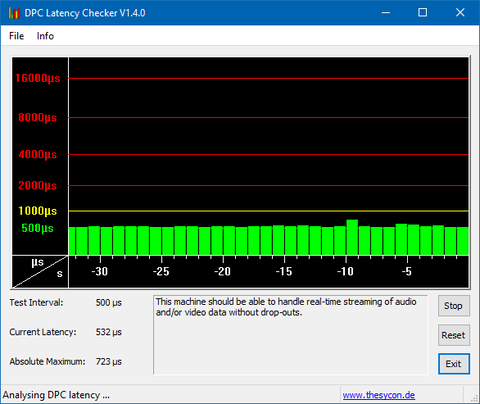
A CPU használat viszont továbbra is túl magas (7-11% idle), nagyon messze van még a tavalyi build 2-5%-os idle állapotától egy 4 magos i5-ön. De a Defender erőforrás zabálása megszűnt.
-
Milestone2
nagyúr
-
pzstm
Topikgazda
Nem segített, de mindegy is, majd jön ha jön, ha meg nem akkor WZor segít.
nem aMD a procid? azok kimaradnak most
-
vlevi
nagyúr
"Mute-a-Tab! This build introduces a new experience for muting a tab playing audio. The audio "
Azt a nyüves mindenit, micsoda újdonság
Firefox, Chrome kb 1 (vagy 2?) éve tudja. És nem is kell jobbegér mute, csak a FF lap fülön a némításra kattintani.
Sőt, mostanság, ha a háttérben egy új lapon indítod el a YT videót, addíg el sem kezdi lejátszani, amíg át nem váltasz erre a lapra. -
Milestone2
nagyúr
-
westlake
félisten
Hát nekem 17025-ről még "nem lelé" a 35-ös végűt, de ami késik, nem múlik...
"Try stopping (pausing) insider builds and then unpausing."
Több embernél is segített.
-
Milestone2
nagyúr
Hát nekem 17025-ről még "nem lelé" a 35-ös végűt, de ami késik, nem múlik...
-
vlevi
nagyúr
-
norti
addikt
Sajnos haszontalan dolgokra pazarolják az energiájukat.
Az UWP-re gondolok. Eddig se nagyon volt fejlesztőtábora, és mostmár, hogy kijelentették, a Windows Phone megszűnt, már tényleg semmi értelme UWP alá fejleszteni, mert az összes windowst futtató eszköz képes a win32 api futtatására. Még a Windows10S is.
Ez azt jelenti (legalábbis szerintem), hogy UWP alá már csak a legelvetemültebbek fejlesztenek.
Az pedig megintcsak a magánvéleményem, hogy az UWP nem csak, hogy agyonkorlátozott, funkciószegény appokat jelent, hanem még rondák is, és ezen a fluent se nagyon tud segíteni, legalábbis, ami eddig fluent designként kikerült a felhasználók felé, arról inkább nem mondok semmitAz UWP nem csak a mobilt, hanem az Xboxot is jelenti, ami piac szempontjából már nem elhanyagolható.
-
vlevi
nagyúr
Sajnos haszontalan dolgokra pazarolják az energiájukat.
Az UWP-re gondolok. Eddig se nagyon volt fejlesztőtábora, és mostmár, hogy kijelentették, a Windows Phone megszűnt, már tényleg semmi értelme UWP alá fejleszteni, mert az összes windowst futtató eszköz képes a win32 api futtatására. Még a Windows10S is.
Ez azt jelenti (legalábbis szerintem), hogy UWP alá már csak a legelvetemültebbek fejlesztenek.
Az pedig megintcsak a magánvéleményem, hogy az UWP nem csak, hogy agyonkorlátozott, funkciószegény appokat jelent, hanem még rondák is, és ezen a fluent se nagyon tud segíteni, legalábbis, ami eddig fluent designként kikerült a felhasználók felé, arról inkább nem mondok semmit -
norti
addikt
-
norti
addikt
Chrome alatt (HP625) nem csak hogy megeszi, de "kékhalál"-t okoz a beépített videó... Edge-n lejátssza.
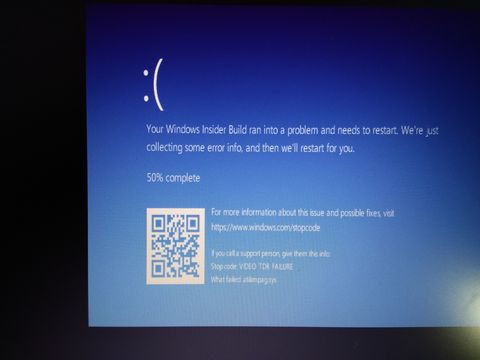
Fórumokon is sokat panaszkodnak, hogy laggy a GUI, amit én is észreveszek egy idő után (fél-egy nap bekapcsolt állapot). Amúgy Netflix, Twitch kliensek streamje is akad, plusz a játékoknál újra előfordulnak mikrolagok, akadások (gamebar és egyéb funkciói továbbra is kikapcsolva), tehát megint vmi grafikus alrendszer bug van (esetleg még a Defender se jó)
-
Milestone2
nagyúr
Chrome alatt (HP625) nem csak hogy megeszi, de "kékhalál"-t okoz a beépített videó... Edge-n lejátssza.
-
norti
addikt
17017 alatt bugos a Windows Defender real time protection, megeszi a CPU-t szinte minden böngészős videólejátszásnál (meg szerintem másnál is). 4 magon 20-30% használat folyamatosan, ha be van kapcsolva.
-
pzstm
Topikgazda
Cumulative Update Build 16299.20 (KB4043961) is currently rolling out to Windows Insiders running Build 16299.15. This update only includes quality improvements and no new OS features. Key improvements include:
- Addressed issue where, after removing apps, they’re reinstalled on every restart, logoff, and login.
- Addressed issue where localization of the error output from a JET database is broken. Only English error strings are reported.
- Security updates to Windows kernel-mode drivers, Microsoft Graphics Component, Internet Explorer, Windows kernel, Microsoft Windows Search Component, Windows TPM, Windows NTLM, Device Guard, Microsoft Scripting Engine, Windows Wireless Networking, Microsoft Windows DNS, Windows Server, Microsoft JET Database Engine, and the Windows SMB Server16299.19
Eliras tortent tegnap elsőre
-
Hofeher
aktív tag
17017 alatt nektek működik az edge alatt a flash ?
-
norti
addikt
x64 hu-hu Pro is rendben van már:

Amatőrök...
-
norti
addikt
-
pzstm
Topikgazda
Cumulative Update Build 16299.20 (KB4043961) is currently rolling out to Windows Insiders running Build 16299.15. This update only includes quality improvements and no new OS features. Key improvements include:
- Addressed issue where, after removing apps, they’re reinstalled on every restart, logoff, and login.
- Addressed issue where localization of the error output from a JET database is broken. Only English error strings are reported.
- Security updates to Windows kernel-mode drivers, Microsoft Graphics Component, Internet Explorer, Windows kernel, Microsoft Windows Search Component, Windows TPM, Windows NTLM, Device Guard, Microsoft Scripting Engine, Windows Wireless Networking, Microsoft Windows DNS, Windows Server, Microsoft JET Database Engine, and the Windows SMB ServerUjratelepulo app hiba csunya ha bent maradt volna
-
norti
addikt
Cumulative Update Build 16299.20 (KB4043961) is currently rolling out to Windows Insiders running Build 16299.15. This update only includes quality improvements and no new OS features. Key improvements include:
- Addressed issue where, after removing apps, they’re reinstalled on every restart, logoff, and login.
- Addressed issue where localization of the error output from a JET database is broken. Only English error strings are reported.
- Security updates to Windows kernel-mode drivers, Microsoft Graphics Component, Internet Explorer, Windows kernel, Microsoft Windows Search Component, Windows TPM, Windows NTLM, Device Guard, Microsoft Scripting Engine, Windows Wireless Networking, Microsoft Windows DNS, Windows Server, Microsoft JET Database Engine, and the Windows SMB Server -
norti
addikt
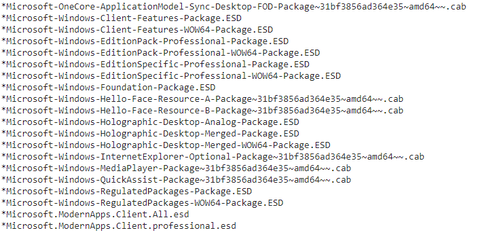
Van egy "kis" hiba az UUP-vel, pl. language specifikus buildeknél nem léteznek a nyelvi ESD-k a Microsoft szerverein (legalábbis x64 buildnél, armnál pl. ott vannak) és nagyon szép hibákat dobál a WU
Valamit nagyon megkutyultak most, de már írták twitteren, hogy rajta vannak az ügyön x64:
arm64: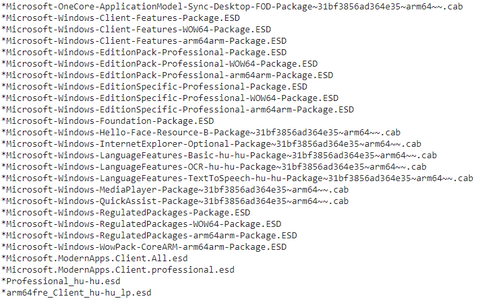
Itt a tenforums thread is.
Whoever is pressing the RED button over at Redmond, is multitasking too much. They should not announce, nor open the ports in WU for a new upgrade until it has fully been uploaded around the globe on ALL MS servers.

-
norti
addikt
Van egy "kis" hiba az UUP-vel, pl. language specifikus buildeknél nem léteznek a nyelvi ESD-k a Microsoft szerverein (legalábbis x64 buildnél, armnál pl. ott vannak) és nagyon szép hibákat dobál a WU
Valamit nagyon megkutyultak most, de már írták twitteren, hogy rajta vannak az ügyön x64:
arm64:Itt a tenforums thread is.
-
westlake
félisten
Udv a Fast Ringeseknek RS4-en
[Announcing Windows 10 Insider Preview Build 17017 for PC] -
pzstm
Topikgazda
Udv a Fast Ringeseknek RS4-en
[Announcing Windows 10 Insider Preview Build 17017 for PC] -
norti
addikt
Kint van release preview-n is a build + a Microsoft akaratlanul is megerősítette a feedback hub tegnapi hírében (ami a fast ring és a skip ahead egyesítéséről szól), hogy ez a végleges, ha még valaki kételkedett volna
A menu will pop up and you will need to choose “Stop Insider builds completely”. This will keep you on the Windows 10 Fall Creators Update (Build 16299.15).
-
#41133696
törölt tag
-
westlake
félisten
Az RS3 október 17-én válik hivatalossá. Frissítés (teljesen logikusan), csak a megjelenés után érkezik hozzá. Magyarul a 16299.15 még minimum 7 napig ugyanaz marad.
-
#41133696
törölt tag
Este 19:00 után lesz a havi foltozó kedd... Ha előtte lépek ki az Insider programból, akkor megkapja mint végleges a biztonsági frissítéseket? Vagy sem?
-
pzstm
Topikgazda
Brandon is #UghZacVerified account @brandonleblanc 14h14 hours ago
More Brandon is #UghZac Retweeted Neowin
We don't have a PC flight scheduled to go out tomorrow. But later this week...mára nincs kilátásban PC build....tegnap legalábbis még nem volt
-
westlake
félisten
-
BiP
nagyúr
Azt hittem, hogy majd csak a hivatalos megjelenés után történik meg az összefésülés, amikor a skip aheadből sima fast ring lesz. (ill. rs_prerelease-ből rs_release)
(#1410) GoodSpeed: Majd ha feltelepült, utána próbálkozz meg a leválasztással. Esetleg átváltani release-ring-re.
-
#41133696
törölt tag
Most jön, ha települt, hogyan lehet az Inside ről kilépni? Swiftkey... Bocsi. Mert hiába megyek a leválasztásra, meg a leállításra, egyikkel sem igazán érek célt
Persze még most települ, szóval majd utána lesz aktuális -
pzstm
Topikgazda
-
westlake
félisten
-
BiP
nagyúr
-
#41133696
törölt tag
-
BiP
nagyúr
-
#41133696
törölt tag
-
BiP
nagyúr
-
BiP
nagyúr


 Mondjuk ez betudható az állandó settings változtatásoknak.
![;]](http://cdn.rios.hu/dl/s/v1.gif)


Új hozzászólás Aktív témák
-
1500 - 1401
3448 - 3401 3400 - 3301 3300 - 3201 3200 - 3101 3100 - 3001 3000 - 2901 2900 - 2801 2800 - 2701 2700 - 2601 2600 - 2501 2500 - 2401 2400 - 2301 2300 - 2201 2200 - 2101 2100 - 2001 2000 - 1901 1900 - 1801 1800 - 1701 1700 - 1601 1600 - 1501 1500 - 1401 1400 - 1301 1300 - 1201 1200 - 1101 1100 - 1001 1000 - 901 900 - 801 800 - 701 700 - 601 600 - 501 500 - 401 400 - 301 300 - 201 200 - 101 100 - 1
-
Fórumok
LOGOUT - lépj ki, lépj be!
LOGOUT reakciók Monologoszféra FototrendGAMEPOD - játék fórumok
PC játékok Konzol játékok MobiljátékokPROHARDVER! - hardver fórumok
Notebookok TV & Audió Digitális fényképezés Alaplapok, chipsetek, memóriák Processzorok, tuning Hűtés, házak, tápok, modding Videokártyák Monitorok Adattárolás Multimédia, életmód, 3D nyomtatás Nyomtatók, szkennerek Tabletek, E-bookok PC, mini PC, barebone, szerver Beviteli eszközök Egyéb hardverek PROHARDVER! BlogokMobilarena - mobil fórumok
Okostelefonok Mobiltelefonok Okosórák Autó+mobil Üzlet és Szolgáltatások Mobilalkalmazások Tartozékok, egyebek Mobilarena blogokIT café - infotech fórumok
Infotech Hálózat, szolgáltatók OS, alkalmazások SzoftverfejlesztésFÁRADT GŐZ - közösségi tér szinte bármiről
Tudomány, oktatás Sport, életmód, utazás, egészség Kultúra, művészet, média Gazdaság, jog Technika, hobbi, otthon Társadalom, közélet Egyéb Lokál PROHARDVER! interaktív
- Mesterséges intelligencia topik
- Revolut
- Milyen légkondit a lakásba?
- Házimozi belépő szinten
- Hardcore café
- Telekom TV SmartBox: szolgáltatói set-top box alacsony korlátokkal
- Blogjában leplezte le a 12V-2x6 tápkonnektor hibáját a Corsair
- Diablo IV
- Windows 11
- Honor 200 Pro - mobilportré
- További aktív témák...
- Játékkulcsok ! : PC Steam, EA App, Ubisoft, Windows és egyéb játékok
- Windows 10 11 Pro Office 19 21 Pro Plus Retail kulcs 1 PC Mac AKCIÓ! Automatikus 0-24
- Eladó jogtiszta, Windows 11/10, Office 2019/2021/2024, Fizikai és Digitális licencek, Számlával.
- MS SQL Server 2016, 2017, 2019
- Microsoft és egyéb dobozos és OEM szoftverek
- Samsung Galaxy S24 FE 128GB, Kártyafüggetlen, 1 Év Garanciával
- HIBÁTLAN iPhone 17 Pro 256GB White Titanium -2 ÉV GARANCIA -Kártyafüggetlen, MS5608, 100% AKKSI
- Samsung Galaxy Watch6 44mm, Újszerű, 1 Év Garanciával
- ADATA 32GB DDR5 4800MHz AD5U480032G-S Memória
- Új! Gigabyte Aero X16 UltraSlim Gamer Laptop Ryzen 7 350 16GB 1TB RTX 5060 16" QHD+ 165Hz Garancia
Állásajánlatok

Cég: Laptopműhely Bt.
Város: Budapest